
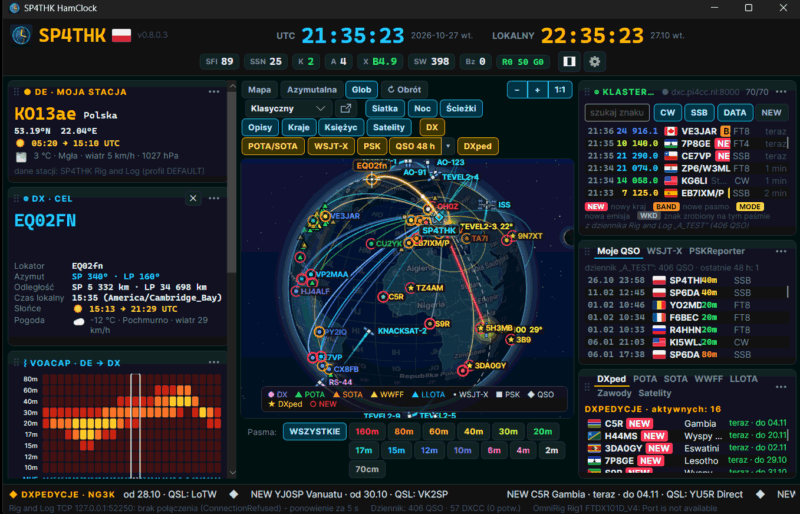
A clock and map for your ham radio station — UTC and local time, grey line, propagation, clusters and spots on one screen. The program is free and works together with Rig And Log.
- World map or globe with night, locator grid, countries, the Moon and satellites — seven map styles.
- DX cluster, POTA, SOTA, WWFF, LLOTA, DXpeditions and contests; a click on a spot tunes the radio.
- WSJT-X / JTDX / MSHV directly (reply to a CQ with a double-click) and spots from PSKReporter.
- VOACAP forecast for the DE → DX path and coverage maps, solar data, D-RAP.
- Radio through OmniRig or Hamlib (rigctld) — frequency, band and mode in the header.
- With Rig And Log: station, logbook and satellites without retyping, recent QSOs on the map, a spot to the log with one click. Also when Rig And Log runs in Wine, in a virtual machine (Parallels) or on another computer in the network.
- Panels arranged your way, landscape or portrait, the map in its own window — also on a second monitor.
- Windows, macOS (Apple Silicon and Intel) and Linux (also Raspberry Pi 4/5); 31 languages.
Test version (beta): the program works, but it may make mistakes and change. Feedback and bug reports are welcome.
Download — version 0.8.0.3 (2026-10-27)
Windows x64 — installerSHA-256: 48dfdc84c369abed94b86e34d16ecfde9fe2b45c7bb0dad42502c29d103244b8 | ||
Windows ARM64 — installerSHA-256: 2dcee8947af73628a7309fcc420d94066ee802ce92f920f22fdc2c183cc9526d | ||
Windows x64 — ZIP (no installation)SHA-256: 2b68d3ce0aeadae02fe96389a118b70cc09d69f039cdb1d96ccbbb12252528e4 | ||
Windows ARM64 — ZIP (no installation)SHA-256: 9afca3f6fb9f43754b5f366b6662dc3a708184e3429e61b0561b8212e32eab29 | ||
macOS (Apple Silicon) — ZIPSHA-256: a48e7acc9e17612a805c04408c243aaa1570c41c0d573ec3882d536ccfd5fd9a | ||
macOS (Intel) — ZIPSHA-256: bc84f595d0b3d4bd528652f98402317d847a217506301c0e9ba3bdb9e1786c5f | ||
Linux x64 — tar.gzSHA-256: 391ccad39c3cecd34766aa032128bd3c2e41fea08a17c2a070c251e69e574e8a | ||
Linux ARM64 (Raspberry Pi) — tar.gzSHA-256: 2b31bcdc964e21cab7b5afda4fff89adffaffc90a5a0cec778bfa310db629e29 |
Downloads: 326
Installation
- Windows:
- run the installer (no administrator rights needed). No .NET needed — everything is included.
- ZIP version: unzip anywhere, e.g. to a USB stick, and run
HamClock.exe.
- macOS:
- unzip and move “HamClock” to Applications.
- First start: right-click → Open (the program is not yet signed with an Apple certificate).
- Linux:
tar xzf HamClock-linux-x64.tar.gz,- then
./HamClock/HamClock. - Menu shortcut (once):
./HamClock/install.sh.
With Rig And Log
On the same Windows, tick “SP4THK HamClock (program)” in Rig And Log (Configure LogBook and program → HamClock) — HamClock takes the station, logbook and satellites from the log, and with autostart it starts and closes together with it. When Rig And Log runs in Wine, in a virtual machine or on another computer, choose “Other computer / system (network)” there, and in HamClock (Settings → Rig and Log) “Connect to Rig and Log over the network”.
Find it useful? Buy me a coffee ☕ — 73, SP4THK